Posts

Showing posts with the label JavaScript

P2P Zero-Knowledge-Proof based Opensource Social Network - HexHoot

I find that the domain name that I purchased on an impulse, hexhoot.com, would be the ideal name for the p2p social network; both of which I described in some of my previous posts. I have been working on it during my pasttime for about a month now, and I decided to make it opensource. You can have a look at the project using the following link: https://github.com/zenineasa/hexhoot I have attempted to follow all the best development practices as much as I can. I have written tests, and, enabled continuous integration feature in GitHub to run all the tests, lint and copyright checks for the code changes that is being made. I also have captured all the foreseeable tasks in a Trello dashboard. This helps me keep track of all the bugs that I have detected and all the important tasks that need to be completed. There are quite a lot of tasks left to make this bug-free and feature-rich. I hope I will find enough time and motivation to do the same in the coming days.

Regarding a Covid-19 related project that I worked on a few months ago

Image
A little over a year ago, I had written a blog post in this blog titled " COVID-19 Disease Spreading Simulation ". That was something that I worked on in a very short time frame. A few months after that, during a conversation with an old professor of mine, Dr. Jimson Mathew, we discussed modifying it further to create something really interesting. We started working on creating "A Framework for COVID-19 Cure or Vaccine Distribution Modeling, Analysis and Decision Making" in October 2020 and finished creating it and drafting a research paper about it in the first week of November 2020. We had submitted this to the Journal of Simulation, but the reviewers rejected the paper citing more information recently. Of course, we will be editing the paper and re-submitting it; however, I thought it would be better if I uploaded the project in the public domain so that anyone who would like to use it can do the same without having to wait. I have made this available on GitHub. ...

Phone as Trackpad for your Computer

Image
I am pretty sure that I am not the only one who crave for a mouse when I don't have one and crave for a trackpad when I don't have access to one. I have a few ideas on turning your phone into a mouse and a trackpad. Let us focus on the later in this blog post. There are two components to this experiment; the first is a server on the computer that you wish to control and the second is a web app that is opened up on your phone that will transmit coordinate data to the server. I think we'll create the server in Python and the web app in JavaScript. Let's get started with creating the server. We'll use 'Flask' to handle API requests and 'PyAutoGUI' to control the mouse. We'll have APIs defined equivalent to cursor move and click for now. import pyautogui from flask import Flask, render_template app = Flask(__name__) # Apparently flask doesn't support negative numbers. So offsetting it. coordinateShifter = 1000 @app.route('/') def index():...

Using Google Translator to Internationalize your code

Image
While developing a software, it is often desired that it would be available in multiple languages so that more people can use it. Some standard coding practices include storing messages visible to the user in a JSON or an XML file in English, and have it translated to multiple languages and save it as JSON or XML files with the corresponding language name. In this blog post, I am going to mock a bunch of messages in JSON format and use Google Translator to generate a JSON string with all messages translated. We shall be using Google Translator page and the developer tools,  and not the APIs. As stated above, the first step is to create the mock JSON string having messages in English. I think the following would be good enough to represent the same loaded into a variable. var en_json = { "edit": "edit", "open": "open", "message_continue": "Do you wish to continue", "message_error": "Error performing the a...

Drawing in the Air

Drawing in the air For someone who is completely unaware about image processing, this project would seem something out of the world. The people with some understanding about how to read an image pixel by pixel would have some understanding about what I am doing here. I am building a program in JavaScript that takes input from the computer's webcam and create a tool that lets you draw in the air and that gets displayed on the computer. For this, we will have a special pen to which we code our program to detect. To get started, let's use the <video> tag to receive the video feed from the camera, which I will later make invisible.. We'll also have two <canvas> tags that would each hold the current video frame and the drawing output from the tool respectively. We shall also have a button that clears data from the second canvas that has the drawing output. <video autoplay="true" id="videoElement"></video> <canvas id="canvas...

Attempt to Draw a Clip Art of a person using JavaScript

I have been thinking a lot on what to blog about. I have not been able to find some interesting topic to write about. So, I have been reading through the news and different online content and until I observed a clip art of a person. It was an image and storing and retreiving an image takes more data to be transfered from the server to the client. I bet it would be much more efficient if we simply programmed it in. In this post, I am going to attempt to draw a person in using JavaScript. Creation of HTML DIVs and adding the styles shall also be taken care of from the JavaScript side. First let's set up the drawing canvas. I will be using DIVs in this attempt and not going to use any of the SVG related tags. var canvas = document.createElement("div"); canvas.style.background = "#efefef"; canvas.style.width = "500px"; canvas.style.height = "500px"; document.body.appendChild(canvas); Now, let's create the head. The head may b...

Interactive Monty Hall Problem Implementation

Image
I may have watched too many videos about Monty Hall problem on YouTube. Many vloggers have attempted to explain the solution to the problem using their skills. I did not search for whether someone has published this before, but I am going to attempt to create a virtual version of the problem in this blog, although it is likely that at least a few people did create this. Some information from WikiPedia: The problem was originally posed (and solved) in a letter by Steve Selvin to the American Statistician in 1975. There was a game show named  Let's Make a Deal , created and produced by Stefan Hatos and Monty Hall, the latter serving as its host for nearly 30 years. I have not watched the show, and I am not sure if the entire show was just about this problem or not. The problem statement is as follows: Suppose you're on a game show, and you're given the choice of three doors: Behind one door is a car; behind the others, goats. You pick a door, say No. 1, and the ho...

COVID-19 Disease Spreading Simulation

Image
At the moment, the world is fighting COVID-19. There have been many scientists who made simulations to demonstrate how the disease would spread. There was one simulation which I liked. It was a video in which people were put up as a dot that moved around the canvas. I want to reproduce that in JavaScript and make it tunable.  View this in a new tab:  Click Here First, let us create a canvas  div, in which all the people would exist. I am feeling a bit lazy to create a separate stylesheet. I will keep all the styles within the HTML Tags. <div id="canvas" style="position: absolute; width: 500px; height: 500px; background: #efefef"></div> Next, let us define a class named Person. The person starts at a random coordinate and moves in a random direction. const maxVel = 5; class Person{     constructor(){         this.div = document.createElement("div");         this.div.style.width = "4px"; ...

da Vinci of the 21st Century

Image
According to many sources, Leonardo Da Vinci is known for hiding secret codes and messages in his art work. In the modern era, digital canvases and images have a greater role to play. An image of width w  and height h  contains w  x h pixels. Changing the RGB values by a small value would not be detectable to naked eye. In this blog post, let me show you how to encrypt and decrypt messages using this principle. We'll do both encryption and decryption using JavaScript. To get started with, I downloaded a very nice picture of Mona Lisa from Wikipedia (. I also created an image with black text in a white background, which I shall not show here ( message.jpg ). Next, I setup a good HTML platform to run back to back JavaScript commands, which would automatically load all the images I need. To avoid CORS issue, I have been running a SimpleHTTPServer to open up the webpage. <html> <body> <img src="725px-Mona_Lisa,_by_Leonardo_da_Vinci,_fr...

Image to a string in JavaScript

Image
There may be various methods to convert an image into a one dimensional data. JavaScript enables you to convert and store images in string format and most modern browsers would be able to render that image. For instance, the following string contains Google's logo. You can check this by copy-pasting it on a browser addressbar. It is possible that some of you may think the the image could be loaded from an external website. For those people, I would like to recommend them to turn their internet off and paste the following on their addressbar. data:image/png;base64,iVBORw0KGgoAAAANSUhEUgAAALgAAAA8CAYAAADVEnAJAAAOvklEQVR42u1dCZBcRRluyM4Sbg9QuUTFYAhy7Zs3G2Nw5r2ZTWKMWBCXQ5QzIncEFIqjGGtnZpdwaEUOIYcFlBwVRBA5wh7hUIIQCFgkJCAWBUWSnZ3N9d7MXgk7/p/sZje72/3umR2rv6quDOyb1zXd3/v77+///37MD0STxapYY6FWT+ev0zP5h7W0sTqWyWdjGaNA/13UU0Yf/ZvT08bbWjr/GH2+Qc8YJyv3FUNMQmK8Qk8XIrGM+Qc9ld8CIjttn33PvC/elD+JSUiMFxAp64igL4GkvrW08TytADVMouIQfnRucazGKg11qe6v62nzryBkIC1l9NO/d0eT2f2YhCR4ia32T2MpMw8iBt20TP79eIN5...

Estimating the value of Pi using Monte Carlo Method

Image
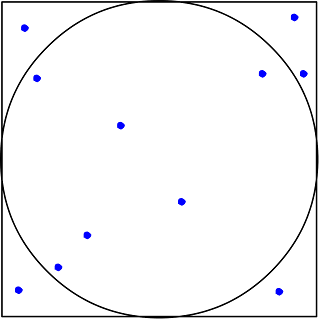
The very first moment I was shown this, I was amazed. Estimating something using random events is pretty amazing. The first time I did this in MATLAB, but now, I think I will attempt to do the same in JavaScript. The undelying concept of Monte Carlo Method is to use randomness to determine the value. The method is often used to solve problems that are hard to determine exactly, when there is enough statistical data available. Let us define a square centered at the origin with side of length 2. A circle centered at the origin is inscribed in this square. The assumption that we are using in this method is that if we randomly take a few points within the square, the ratio of the number of points that falls within the circle to the total points taken is equal to that of the area of the square and the circle. That is, Area of square / area of circle = totalRandomSamples / totalPointsInCircle Let us write a JavaScript program that could do perform this with a huge number...

Programming bouncing ball in JavaScript

While studying Newton's laws of motion during my schooldays, I found some of the questions related to bouncing ball quite fascinating. The sheer number of different kinds of questions that one could come up with just a ball bouncing on the ground is quite a lot. My attempt is to create the example as simple as possible. I would not be defining additional classes; I would be using the position value which is already present in the DOM Element  and adding velocity as a parameter to the DOM Element . First, let us define the HTML and CSS to get the visual appearance of the ball and the floor right. <html> <style> #ball{     position: absolute;     left: 50%;     top: 0;     width: 50px;     height: 50px;     border-radius: 50%;     background: #005eff; } #floor{     position: absolute;     bottom: 2px;     background: #000;     width: 100%; ...

Slideshow on Google Images

Image
I opened Google Images and searched for Batman , which is probably my favourite Super Hero. I had connected my laptop to a TV screen and I wanted to see all the images as a slideshow. And, just like many other posts in this blog, I started using the Chrome Developer Tools. I clicked on the first image. The image was being displayed on the side and a button to move to the next image came in. I right-clicked on the button and did an Inspect  and I found that the button was having classes  KJaJCe irc-rab . I ran the following command to see if there are other elements with the same class. document.getElementsByClassName('KJaJCe irc-rab') I saw that there were three elements, but the button to go to the next image was always having an index of 1 . So, I went ahead and did the following: a = document.getElementsByClassName('KJaJCe irc-rab')[1]; a.click(); Each time I ran a.click  it showed me the next pic on the right-hand side and I was convinced that if I...